Solar Energy
How to Read Your Solar Monitoring App: One Real Florida Home, Every Number Explained (2026)
How do you read a solar monitoring app?
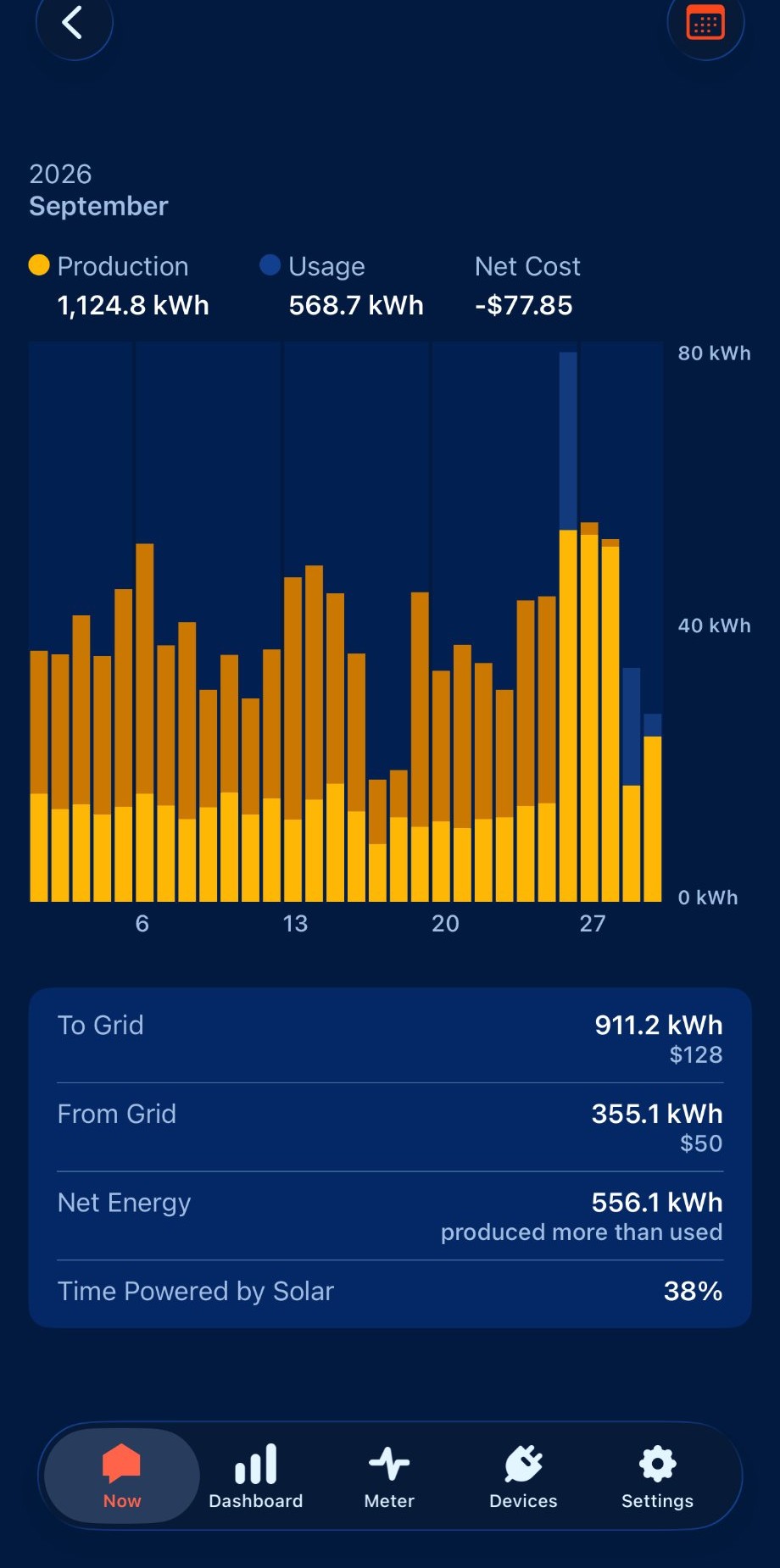
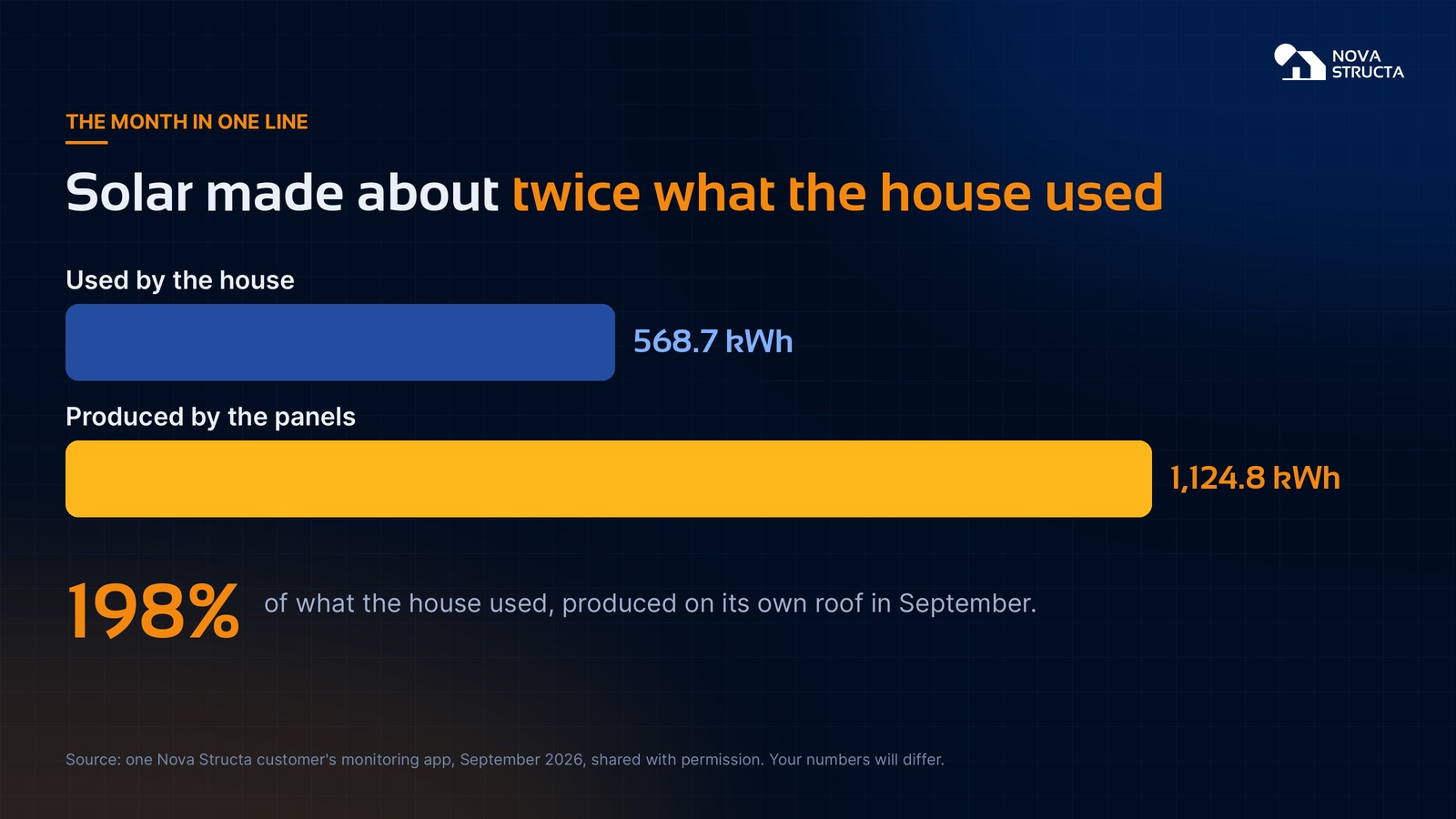
Compare two pairs of numbers: what your panels made against what your house used, and what you sent to the grid against what you took back. In one real Florida home's September, the panels made 1,124.8 kWh while the house used 568.7. The home sent 911.2 kWh out, took only 355.1 back, and finished the month 556.1 kWh ahead, with a net cost of negative $77.85.
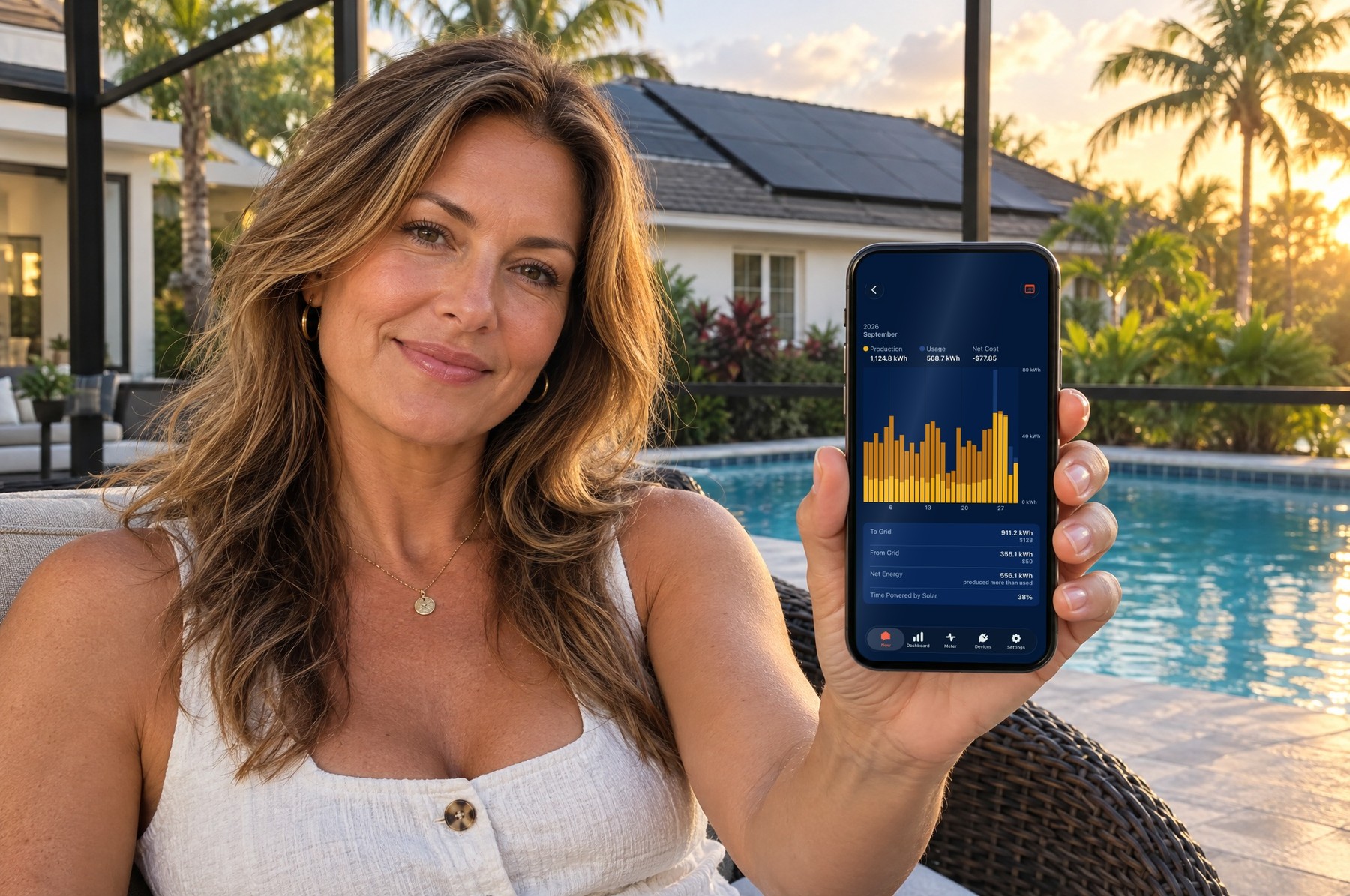
Most people open their solar app twice: the day it is turned on, and the day the first bill looks wrong. That is a shame, because the app is the only place you can see what your system actually does. Your utility bill cannot show it. The power your home uses straight from the panels never passes through the utility meter, so only your inverter app knows how much the system really produced [2].
So instead of a generic tour, we asked a customer for a real month. Below is their September, screen by screen, with the math behind every line. Your app may look different, since Enphase, SolarEdge, Tesla, SPAN and others all draw things their own way, but the four numbers are the same everywhere.
Tap the screen: what every number means
1
2
3
4
5
6
7
8
9
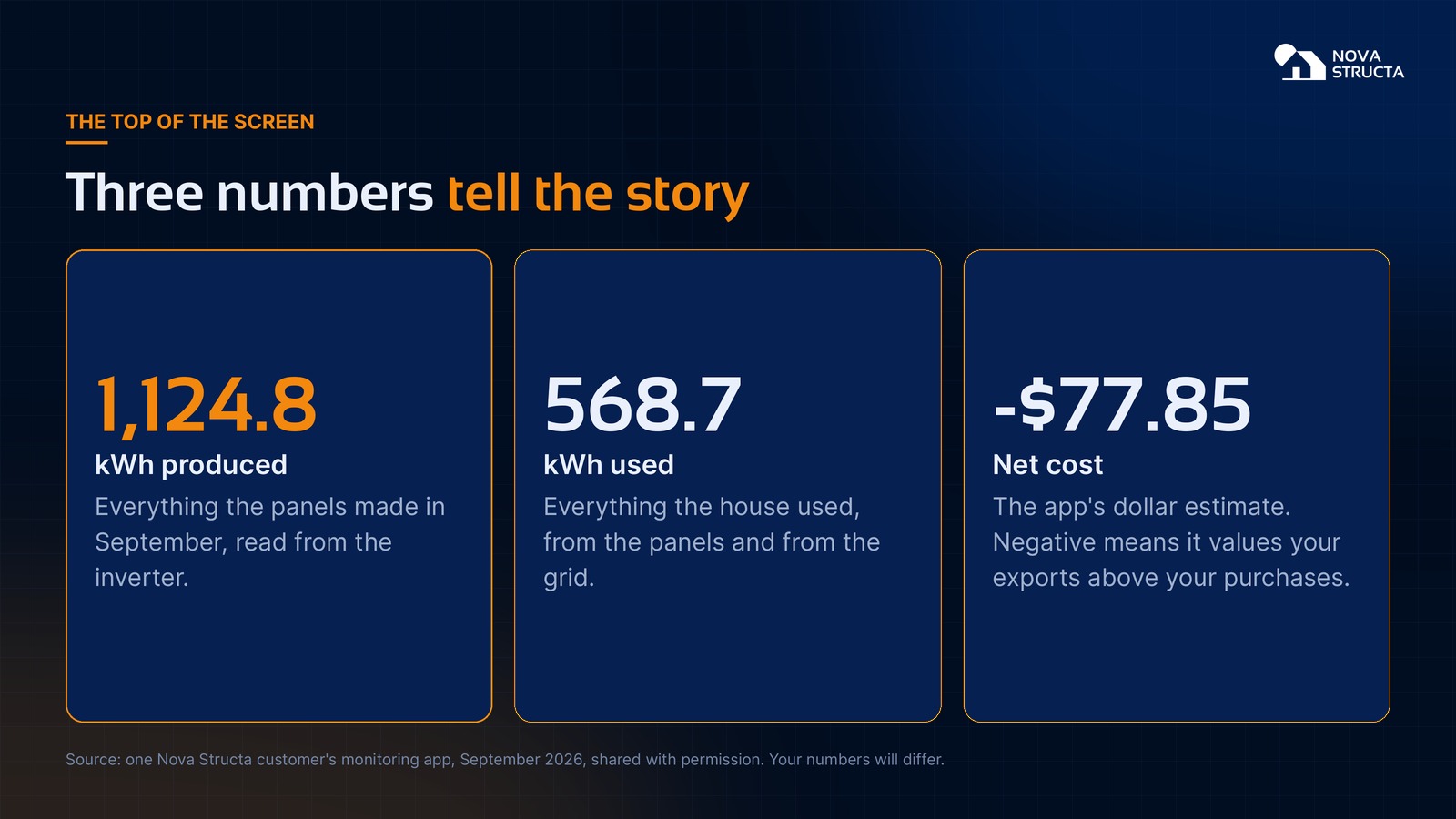
Read this screen in 30 seconds
- Production against usage. The panels made 1,124.8 kWh. The house used 568.7. The roof produced about twice what the whole house needed for the month, so solar more than covered every kWh.
- To grid against from grid. 911.2 kWh went out to the grid. Only 355.1 came back in. The difference, 556.1 kWh, is the Net energy line: the surplus this home produced beyond everything it used.
- Net cost. Negative is good. The app values what went out at $128 and what came in at $50, so the month nets out at -$77.85.
- Time powered by solar, 38%. This is not how much of the house solar paid for. It paid for all of it and then some. It is the share of the time the house ran straight off the panels as they were producing. The rest is evenings and nights, when the panels rest and the house draws from the grid against the credit it built up during the day.
The grid works like your bank
The easiest way to read the grid rows is as a bank account. On sunny days the panels make more than the house can use, so the extra flows out to the grid as deposits. After sunset the house draws power back, and those are withdrawals.
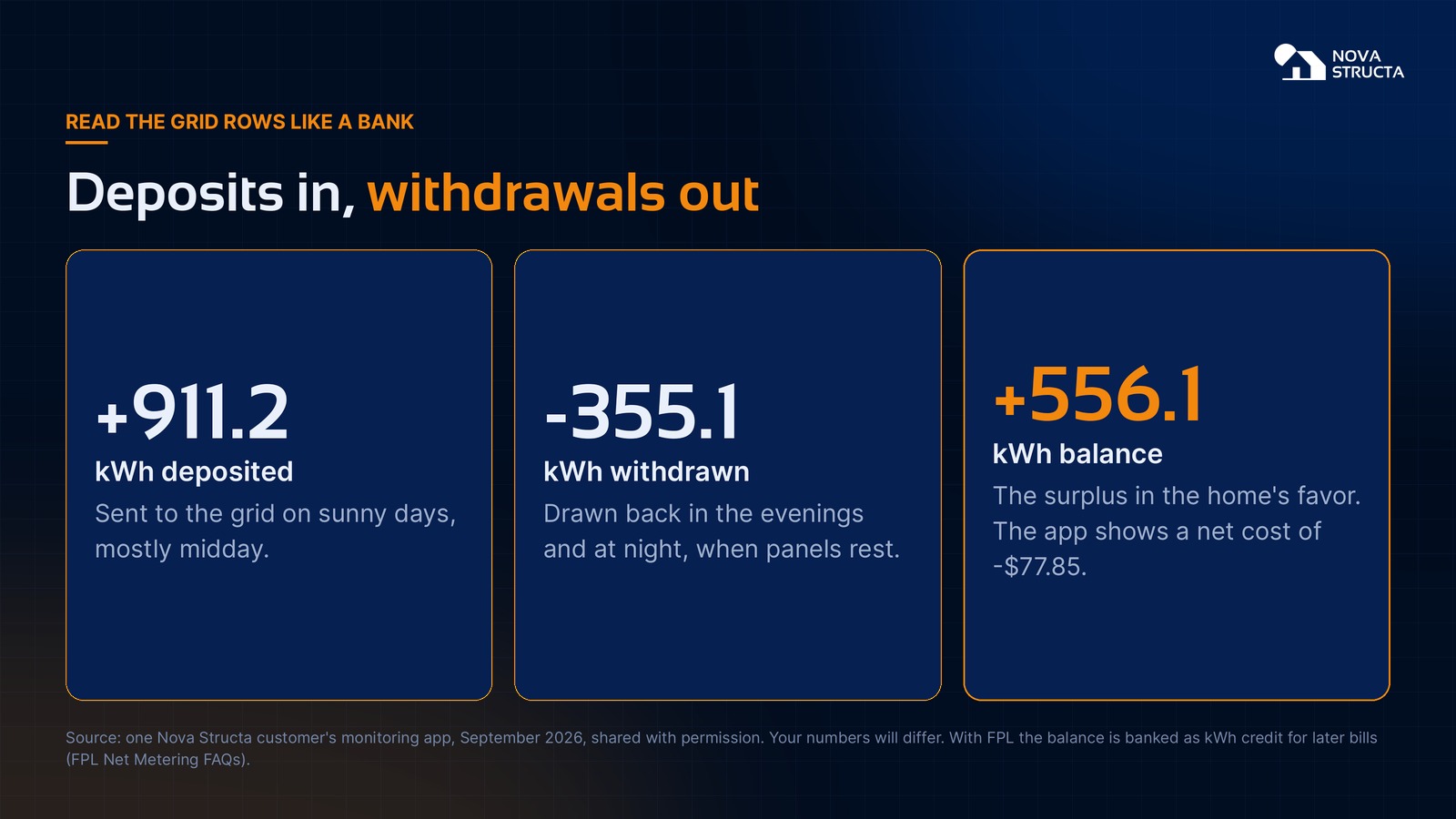
- Deposits: 911.2 kWh sent to the grid, mostly midday.
- Withdrawals: 355.1 kWh drawn back, mostly evenings and nights.
- Balance: +556.1 kWh in the home's favor. With FPL, that balance is banked as kWh credit for later bills [2].
You can also work out a number the app does not show. Produced minus sent to the grid is what the house used live, straight from the panels: 1,124.8 minus 911.2 is 213.6 kWh. Add the 355.1 drawn back at night and you get 568.7 kWh, the house's total use, to the decimal. And 213.6 of 568.7 is about 38%, the same figure the app reports as time powered by solar.
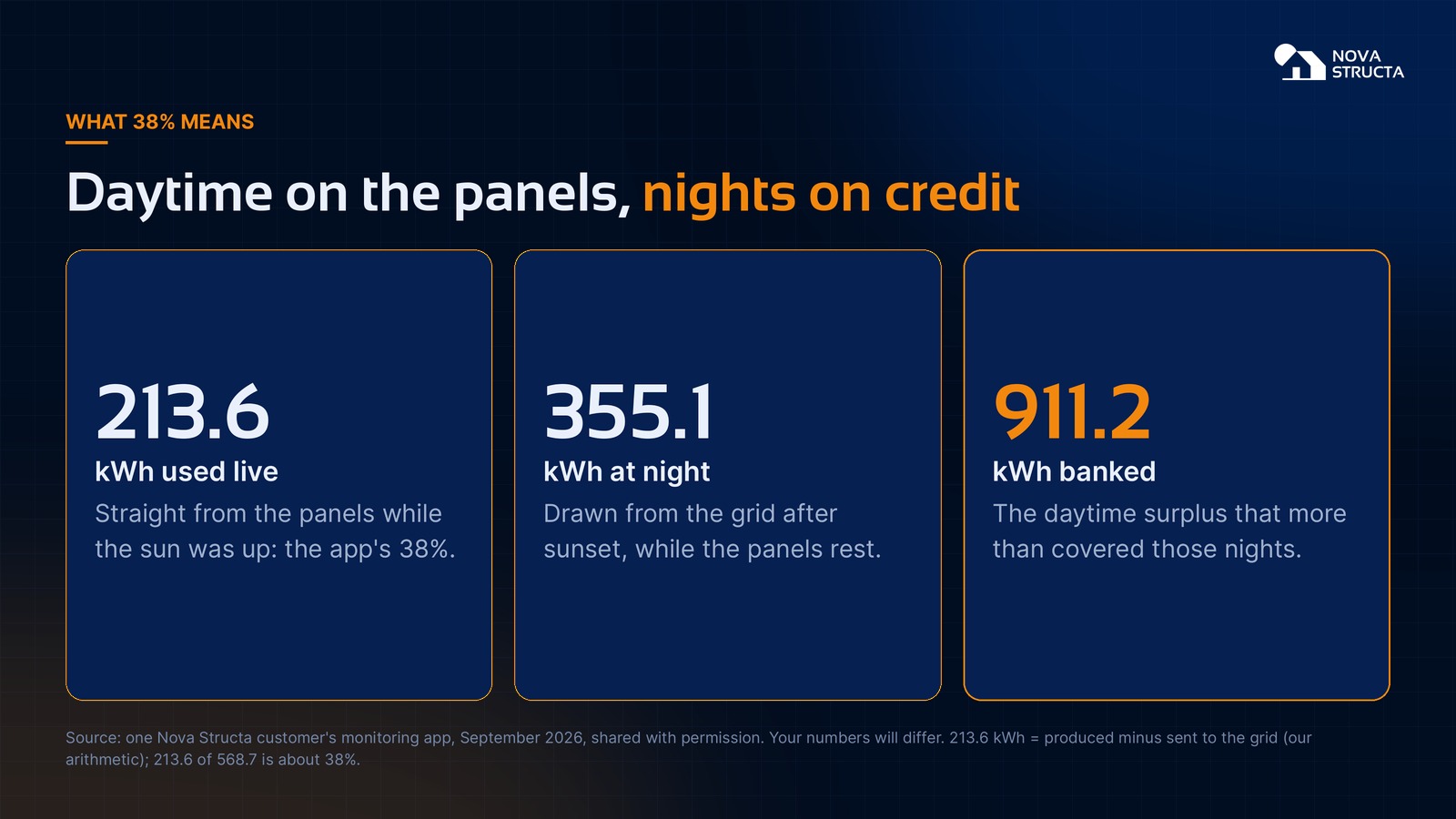
That is exactly how a Florida solar home is supposed to look. The sun peaks around midday, when most families are at work or school, and the house does most of its using in the evening. The grid bridges the two.
One thing worth knowing: banked credit covers your nights on paper, but the power itself still comes from the grid after dark. If you want your own midday solar to run your evening, or to keep the lights on when the grid goes down, that is what a home battery does. We walk through it in powering your home day and night.
One week, up close
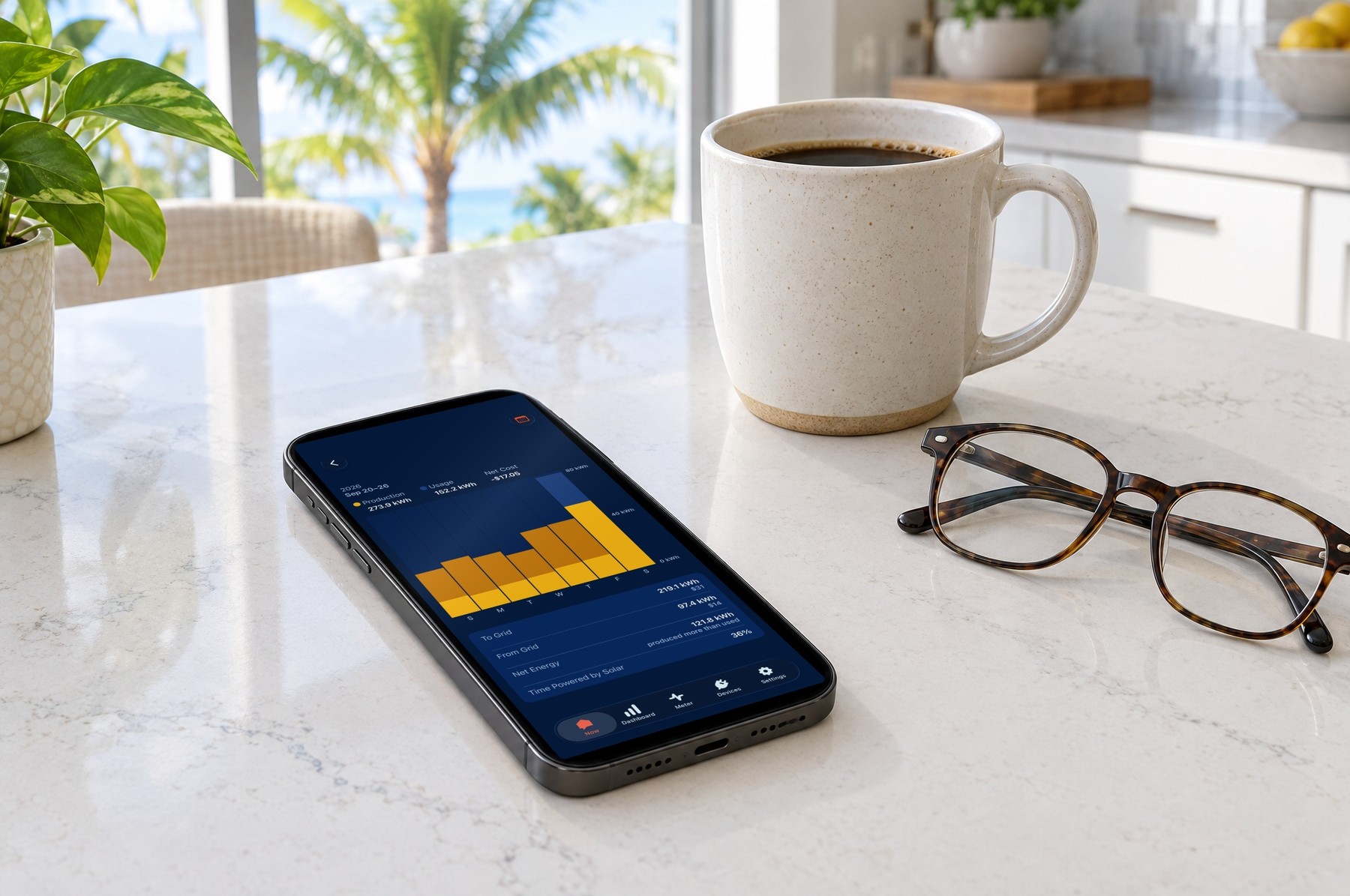
The week view tells the same story at a smaller scale, which is a good sign that the system is steady:
| This week (Sept 20 to 26) | Reading | What it tells you |
|---|---|---|
| Production | 273.9 kWh | About 39 kWh a day from the roof |
| Usage | 152.2 kWh | About 22 kWh a day, with one heavy Saturday |
| To grid | 219.1 kWh | So about 54.8 kWh was used as it was made |
| From grid | 97.4 kWh | Nights and the Saturday spike |
| Time powered by solar | 36% | Right in line with the month's 38% |
That last row is the one to watch over time. If your share stays steady month after month, your system and your habits are steady. A sudden drop with no change at home is worth a look.
Your app's dollars are not your bill
The app values your exports and your purchases at about the same price. In this readout, 911.2 kWh out is worth $128 and 355.1 kWh in costs $50, both about 14 cents a kWh. That is a useful estimate. It is not how your utility settles up.
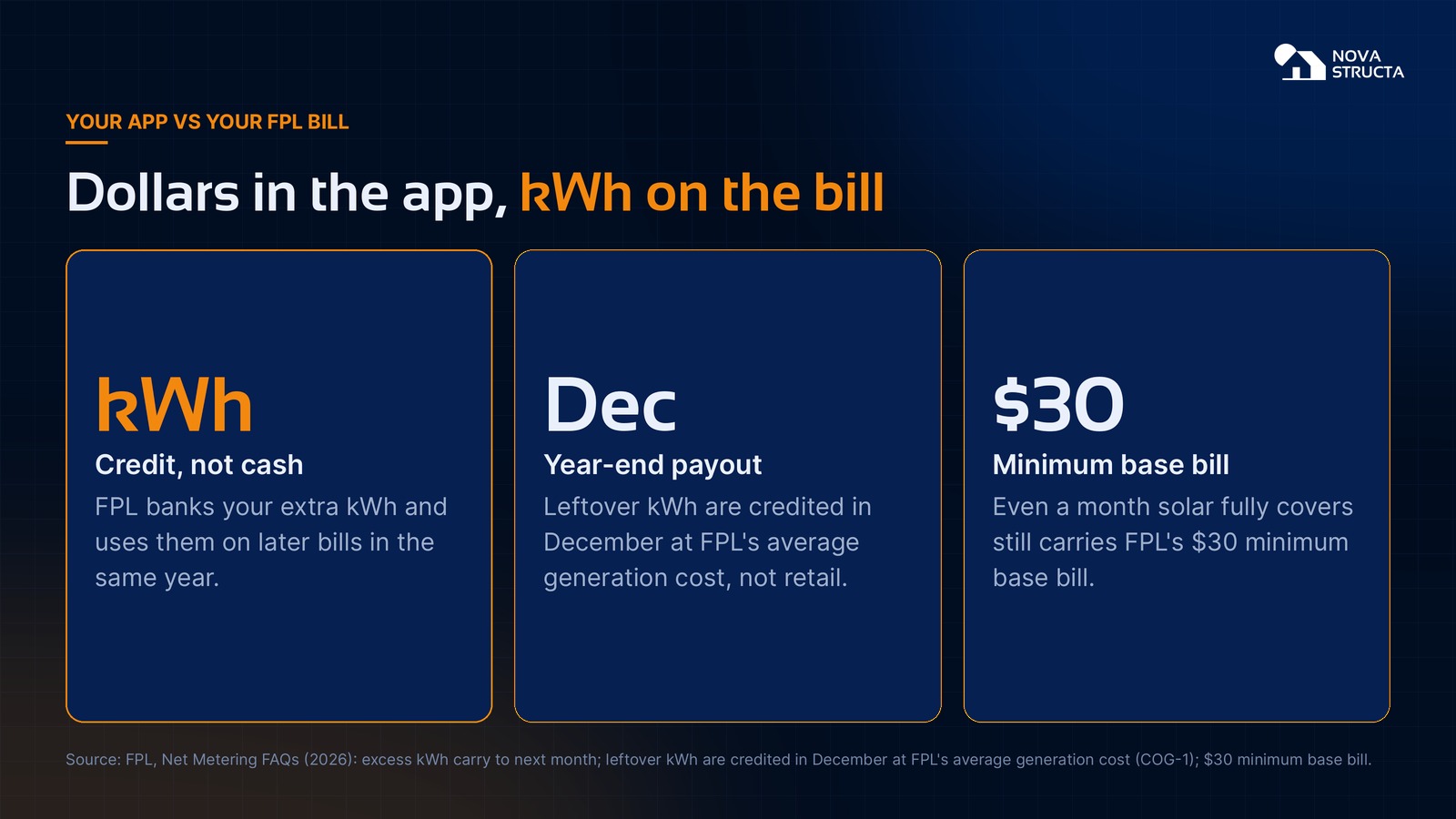
Here is how FPL handles net metering, from its own published rules:
- Credit, not cash. When your system makes more than you use in a month, the extra is applied to next month's bill as kWh, and it keeps rolling through the calendar year [2].
- A December settle-up. If you still have unused kWh in your bank when the meter is read in December, FPL credits them on that bill at its average annual cost of generation, the COG-1 rate, not the retail price you pay [2] [3].
- A floor on every bill. FPL keeps a $30 minimum base bill, so even a month your solar covers in full still carries a charge [2] [4].
- The bill shows the meter, not the roof. Your FPL bill lists what you sent out, what was applied and what is left in your kWh reserve. Only your app shows total production [2].
The rules come from the Florida Public Service Commission's net metering rule for investor-owned utilities [5]. Duke Energy Florida, TECO and city utilities run their own versions, so check your utility. We explain every line of the bill itself in Florida electric bills explained.
| Your solar app | Your FPL bill | |
|---|---|---|
| Shows total production | Yes | No, only what crosses the meter |
| Shows solar used at home | Yes, or you can work it out | No |
| Values exports in | Dollars, at the rate set in the app | kWh credit, then COG-1 in December |
| Includes fixed charges | Usually not | Yes, with a $30 minimum base bill |
| Best for | Spotting problems, learning your home | What you actually pay |
How to read the daily bars
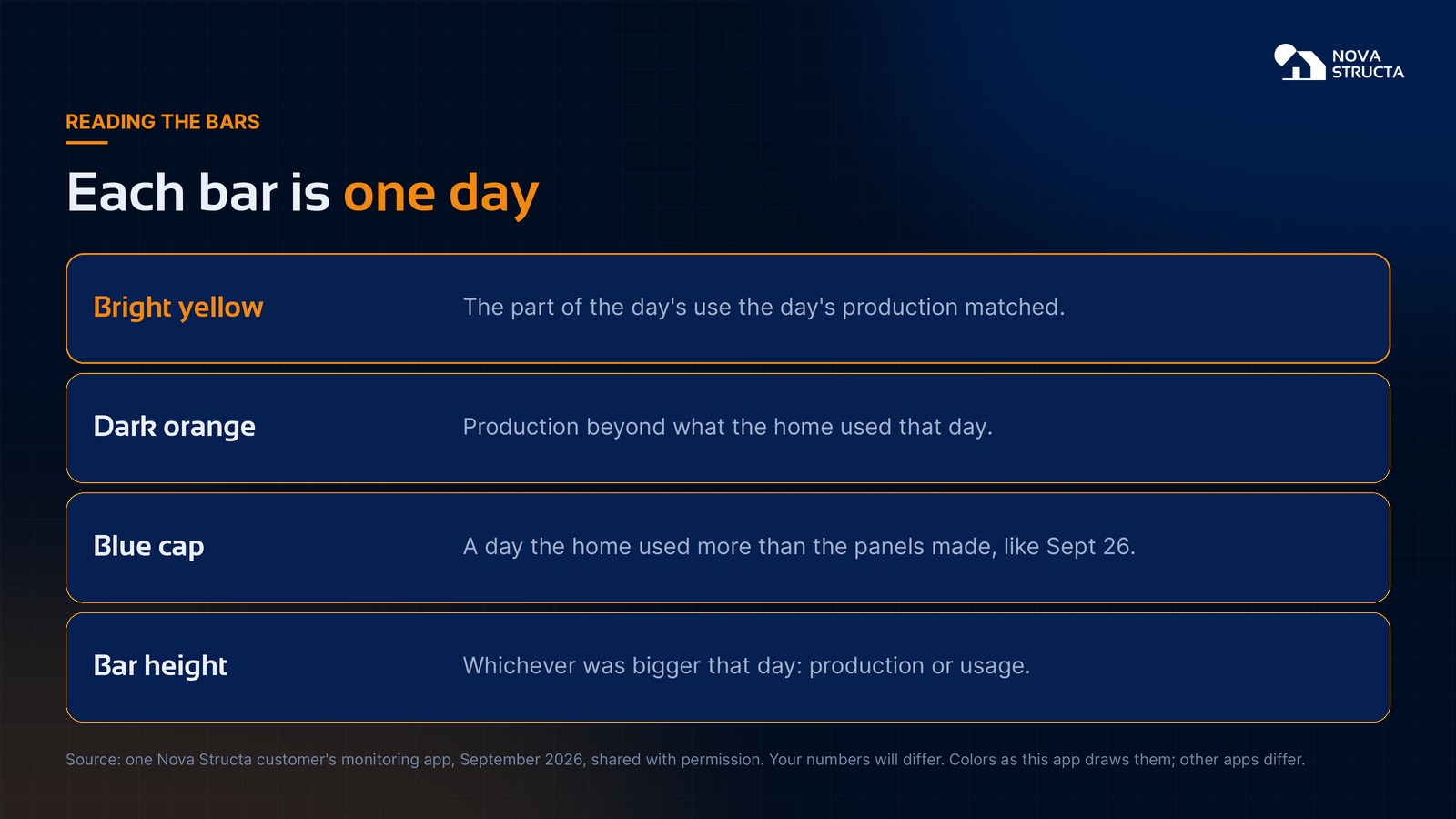
In this app, each bar is one day, and its height is whichever was bigger that day, production or usage. The bright yellow part is where the two overlap. On almost every day in September, the bar is mostly dark orange, which means the panels beat the house by a wide margin. On September 26, the bar turns blue on top: the house used far more than the panels made.
Two things to know when you read bars:
- A daily bar nets the whole day. A day can look fully covered while the house still pulled from the grid that night. That is why the from grid number is bigger than the blue caps suggest.
- Short bars in a row usually mean weather. Look at the two short bars in the middle of the month view, followed by a quick bounce back. That pattern is typically clouds or rain. A week of short bars on sunny days is not.
Normal, or a red flag?
Lower numbers are not always a problem. Florida has cloudy weeks, shorter winter days and summer storms. Check what you are seeing:
Usually normal
Worth a call
red flags checked
Check what you see above. Your result shows here.
Sounds normal. Weather, seasons and your own habits move these numbers every day. Keep an eye on the monthly trend.
Worth a look. One red flag can be a loose connection, a Wi-Fi change or a tripped breaker. Check the breaker and your router, then call your installer if it does not clear up.
Call your installer. More than one red flag usually means something in the system needs attention. Write down the dates and screenshots before you call.
An app that says offline often just lost its Wi-Fi connection, for example after a new router or a power outage. The panels may still be producing. Your installer can confirm it remotely.
A simple routine
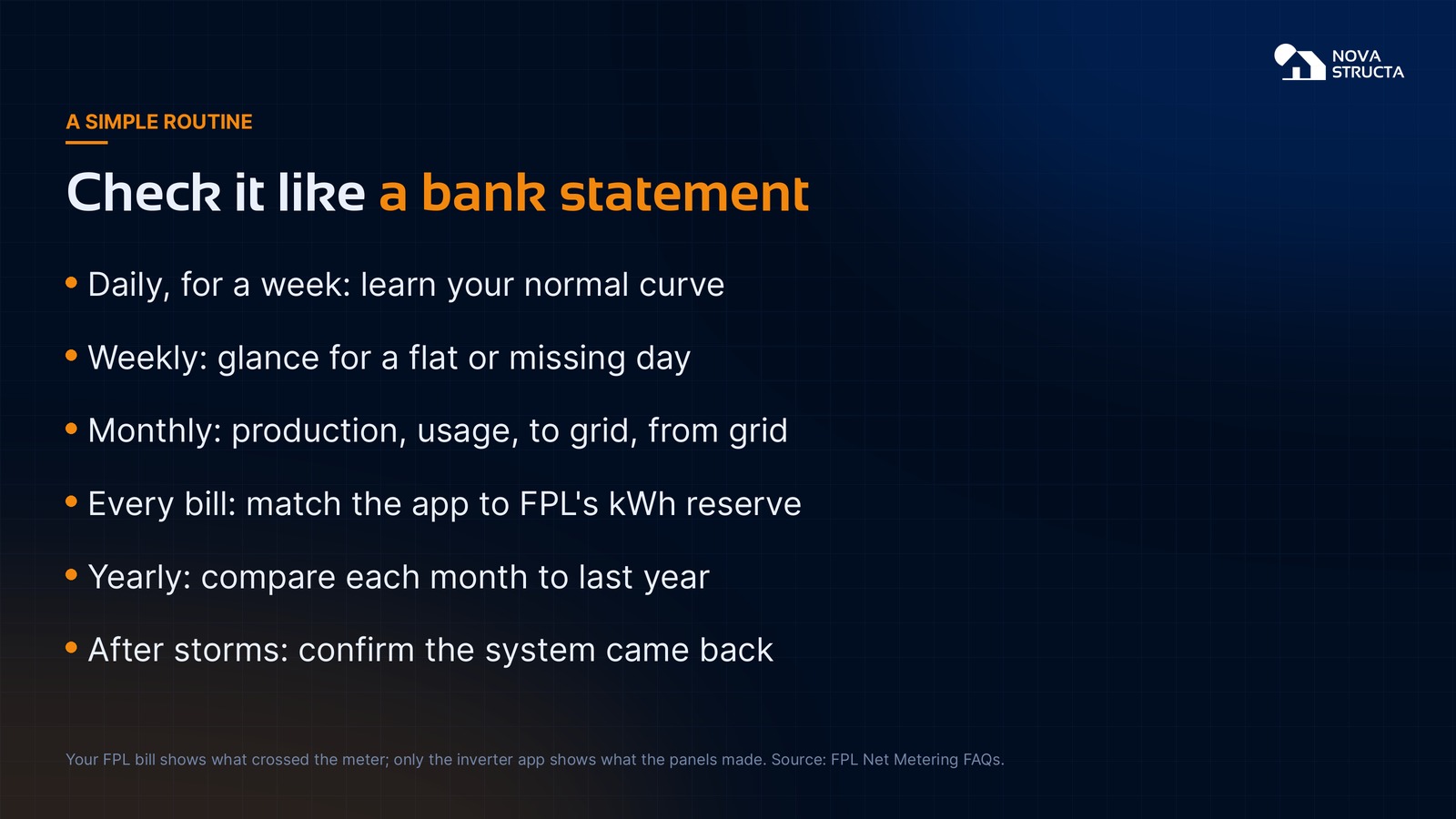
- The first week: check daily. Learn what a normal sunny day and a normal cloudy day look like for your roof.
- After that: glance weekly. You are looking for a flat or missing day, nothing more.
- Monthly: write down four numbers. Production, usage, to grid and from grid. A note on your phone is enough.
- Every bill: match the app to the meter. Your app's to grid number should line up with the energy your bill says you delivered [2].
- Yearly: compare month to month. September this year against September last year is the cleanest check you have. Panels lose a little output each year, so expect small, slow changes, not sudden drops.
- After every storm: confirm it came back. Grid-tied systems shut off in an outage and should restart on their own once power returns.
Not sure what your system should make? NREL's free PVWatts calculator estimates monthly production for any Florida address and roof [7].
Where a battery fits
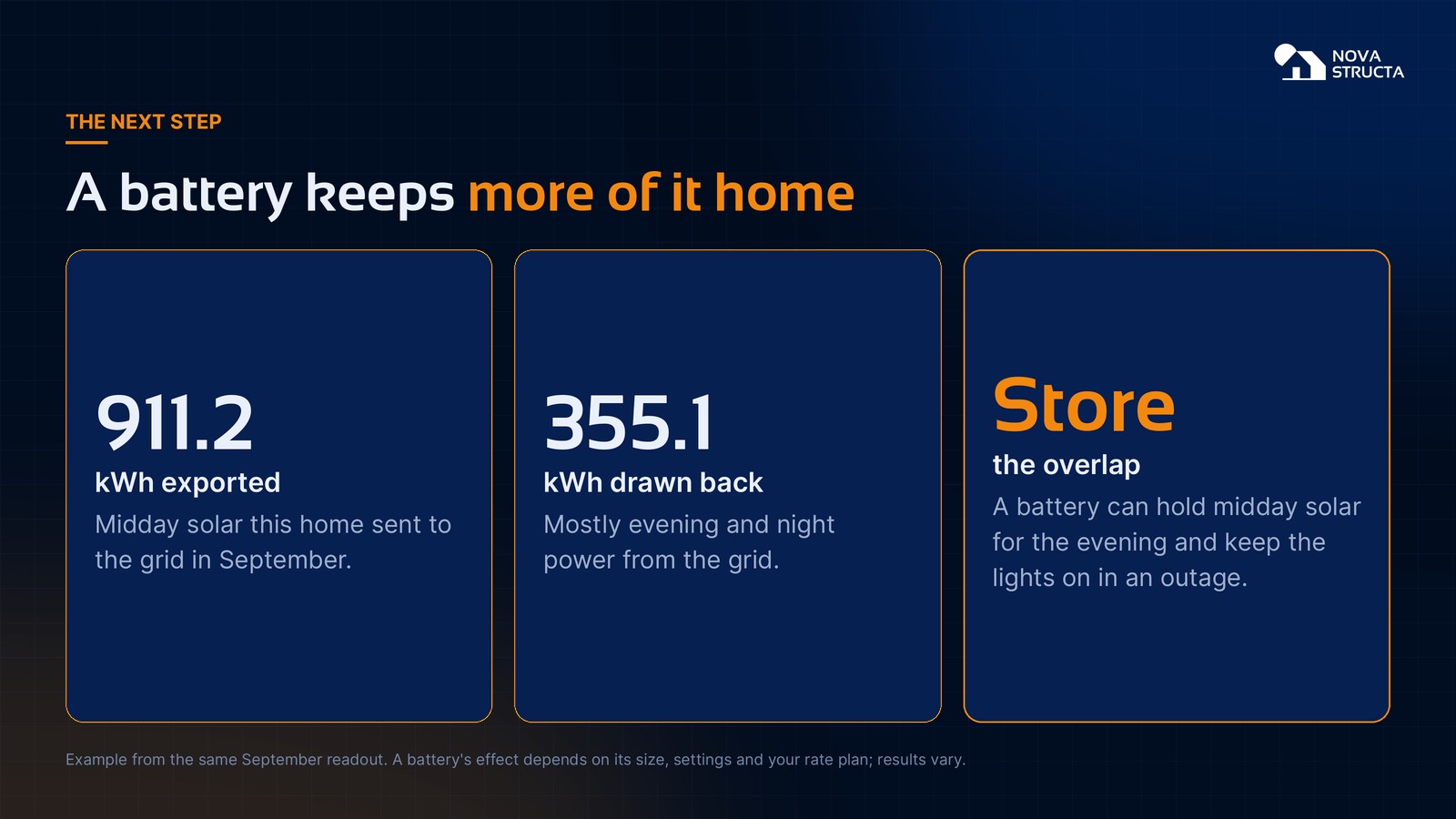
Look at those two numbers side by side: 911.2 kWh sent out at midday and 355.1 kWh drawn back, mostly after dark. A home battery sits in the middle. It stores midday solar for the evening and, just as important in Florida, keeps power on when the grid goes down. Whether it pays off depends on your rate plan and the battery's settings. On FPL's standard net metering, where exported kWh offset the kWh you buy [2], a battery is mainly about backup. See how Powerwalls work during a hurricane.
Questions homeowners ask
Why is my bill not negative if my app says negative net cost?
Because the app counts dollars and FPL counts kWh. Your extra kWh roll forward as credit, any left in December are paid at FPL's average generation cost rather than retail, and every bill carries at least the $30 minimum base bill [2].
Why does my bill show less production than my app?
Your bill only sees what crosses the meter. Solar your home uses the moment it is made never reaches the meter, so only the inverter app shows total production [2].
My panels made more than I used. Why does the app still show power from the grid?
Solar only makes power while the sun is up, and your home uses power around the clock. So the house draws from the grid at night, then pays it back, and more, with what it sends out during the day. In this home's September it sent out 911.2 kWh and drew back 355.1.
What is a good time powered by solar percentage?
It is about timing, not coverage. This home ran 38% of the time straight off its panels and still produced twice what it used. Without a battery, a share in the 30s or 40s is common when most use happens in the evening. Shifting laundry, the dishwasher or EV charging to midday raises it. So does a battery.
What should I do if my app says offline?
Check your Wi-Fi first: a new router or a reset after an outage is the usual cause. Then check the breaker on the solar circuit. If it does not come back within a day, call your installer.
The bottom line
Your solar app is a bank statement for your roof. Read four numbers each month, compare them to last year, and match them to your bill. In this home's September, the app showed a system doing more than its job: twice the power the house needed, 556.1 kWh more than it used, and a net cost of negative $77.85.
Thinking about solar and want to see what yours would look like? Render your home and we will walk you through the numbers, or explore our solar systems. If you are still deciding, start with is solar worth it in Florida in 2026.
The readout on this page is one customer's real data for September 2026, shared with permission; your production, usage and results will differ. Dollar values shown are the app's estimates. Utility rules, rates and credits are set by your utility and regulators and can change. Installations are performed by independent Florida licensed contractor(s).
Sources
- Nova Structa customer, solar monitoring app readouts for September 2026 (month view) and September 20 to 26, 2026 (week view), shared with permission. Derived figures (solar used at home, solar share) are our arithmetic from those readouts.
- Florida Power & Light, Net Metering Frequently Asked Questions (net metering billing, kWh reserve, December credit, $30 minimum base bill, production shown only by the inverter). fpl.com
- Florida Power & Light, Electric Tariff, Section 10, including the COG-1 rate referenced for net metering credits. fpl.com (PDF)
- Florida Power & Light, "Understanding your bill: residential customers." fpl.com (PDF)
- Florida Public Service Commission, Rule 25-6.065, F.A.C., Interconnection and Metering of Customer-Owned Renewable Generation. flrules.org
- U.S. Energy Information Administration, Electric Sales, Revenue, and Average Price, Table 5A, 2024 Average Monthly Bill, Residential. eia.gov (PDF)
- National Renewable Energy Laboratory, PVWatts Calculator. pvwatts.nrel.gov
Savings and utility-bill examples shown are illustrative only, are not guaranteed, and may not reflect typical results. Actual savings depend on your energy usage, system size, roof and site conditions, financing terms, utility rates, net-metering rules, and other factors specific to your home.